Showing posts with label iTunes. Show all posts

Wednesday, January 27, 2010

Apple announces the iPad

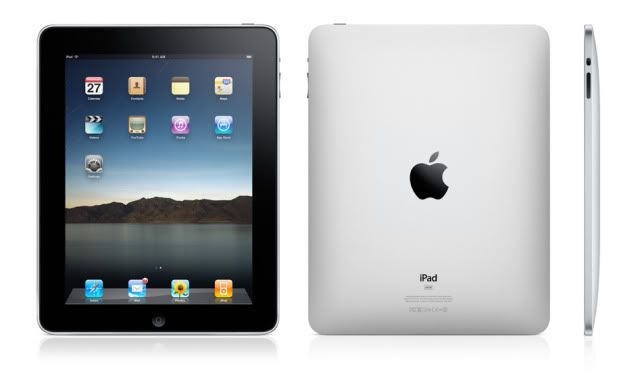
Finally ending months (years maybe?) of speculation, Apple finally announced their long rumored tablet computer, now know as the iPad (see, it's like iPod... but with an "a"). And, before I get into detail, I'm glad this wasn't called the iTablet or iSlate, as rumored, because those just sound awful.


(Note: This is the standard version, the pricier, 3G enabled version has a plastic black bar on top akin to the original iPhone)

Important things first, the iPad features a 9.7" multi-touch screen, an accelerometer, speakers, headphone jack, and microphone input. The standard, 16GB wi-fi enabled iPad will launch at $499, with 32GB and 64GB versions priced at $599 and $699 respectively. For those on the go, without a wi-fi signal, Apple will also be releasing a wi-fi/3G enabled version with the 16GB size costing $629, 32GB costing $729, and the 64GB at $829. Meaning that even if you get the highest model, you'll still pay under $1,000. Sure, it's still expensive, but considering what it can do, it's cheaper than Apple's Macbook options.

So, what can it do? Well, from the looks of it, it's just a big iPod touch/iPhone, right? And, to an extent, it is, but there's more to it. Most notably, the larger interface/CPU, which not only allows apps like E-mail, and Safari to run faster and smoother, but also makes them more intuitive thanks to the larger screen and ability to use a nearly full-size touch-screen keyboard.

Other apps, like iPod and the iTunes and App Stores now benefit from an interface that closely resembles their PC/Mac counterparts, instead of dealing with the iPhone/iPod touch's small screen and touch keys. Also adding to the Mac-like feel of the iPad is a new version of iWorks (for Windows users, this is basically Apple's version of Office), which gives the device a purpose for those looking to use this for work, and not just entertainment or relaxation purposes.

Which brings me to the next feature, iBooks and the iBookstore, not to be confused with Apple's old iBook laptops. Much like the iTunes and App Stores, the iBookstore will allow you to purchase digital versions of new and classic books, with full color printing (so yes, even comics could be available, assumingly) and even added features like audio/video can be included as well; which gives it a bit of a step above Amazon's popular Kindle eBook reader.

But what about all of your iPod touch and iPhone apps that you've purchased over the last few years? Great news! Most, if not all, iPhone apps will run on the iPad without issue. And you can even choose between the option to use them at their original iPhone resolution (in a smaller box), or stretch them to run at full-screen. So if you were to hypothetically buy an iPad right now, you'd need not to worry about repurchasing all of your favorite apps.

Lastly, those looking for a much more computer like interface, Apple will also be releasing a propriety keyboard that also doubles as a stand, giving the iPad the look and feel of a mini iMac, but with an awesome touch-screen display. The standard wifi version of the iPad is expected to ship this March, with wifi/3G enabled iPad expected to release some time this April.

For more information, pictures, videos, and far better explanations of the features, be sure to visit Apple.com's new iPad website.

Wednesday, December 31, 2008

Poll #10 Results

Ok ... I mean it this time, THIS is the last post of 2008.

The question was "How do you buy your music?" you answered:

Both physically and digitally: 62%
CD only: 12%
Digital download only: 12%
I don't buy music: 12%
Vinyl: 0%

Well, I can't say I'm baffled. Personally I buy most of what I can on CD, but nowadays there's just some things you can't find on CD when your only source of music is the local Best Buy; and that's where iTunes comes in. But some people can't stand not having the CD or some people don't find need for a physical product so it's interesting to see that both "only" categories tied.

Then there's "I don't buy music" which was intended for those that literally don't buy music, and just use the radio... not "I don't buy music" but referring to stealing it via torrents, etc. And lastly, the vinyl option; I know some people out there are purists, and that's all they buy, so that option was for you, way to care. Would you rather I put an Eight Track option?

New year's poll is up

Tuesday, September 9, 2008

iTunes 8 Impressions

So, as reported before, I went and downloaded iTunes 8. Right off the bat you'll be introduced to the new Grid view. The view is essentially the same view that Movies and TV Shows were displayed in iTunes 7. But if you're not a fan of that, no worries, because like before, you can change between the List and Cover Flow views. With Grid view, you have some options. You can view your Library by albums, which shows cases the Albums in order of artist and display the artwork. There's the Artist tab, which will feature the boxart of the first album listed for each artist.

The next tab, Genre, is different in that the image it uses to display each catagory is represented by a generic image pertaining to that Genre; if a genre is without an image, it displays the first available album art. Scrolling across each of these genre tabs will display the art of album in that genre, allowing you to see albums from that category as well. This Genre tab is also available in the Grid views for TV Shows, Movies, and Podcasts. After selecting an album, you can press it to play instant, or double click it to view all tracks in a list/art combo view, similar to what was available in iTunes 7.

The next feature is Genius. Now you may remember in the iTunes Store there was an option called "Just For You" which would show titles based upon what you had purchased. You may also remember that the feature always had BETA by it; there's a reason, because it's Genius now. Just For You is no longer in the iTunes Store in favor of this new system. To set it up, select Genius from your Playlists and it'll get to work. Now when you select a track, you can hit the Genius button on the bottom bar and a Playlist will form of similar tracks. I'd say the feature works quite well because I've discovered similarly toned songs without ever thinking to relate them. Also available is the Genius sidebar, which can be shown or hidden with the click of a button. What this does is, by highlighting a track, it'll display similar songs that are available in the iTunes Store, and you can preview the track right there without having to access the iTunes Store.

However, there are going to be those who would rather not bother with this system, and that's fine. You need to set up Genius, so if you never set it up, you never have to deal with it, it's that simple. However if you do set it up, but would rather not use it, you can choose t hide the side bar and simply ignore the option in the Playlists. And if you don't like the Grid view, and feel more comfortable using the List or Cover flow views, then by all means do so.

All in all, I think these new features are quite welcome to iTunes and just music listeners. The Genius tool does make you think about your Library, especially when you see similarities in tracks you would have never associated together. My only gripe about Genius is that it only works with tracks available in the iTunes Store, so if you want to find something similar to the "Kid Icarus theme" of off Super Smash Bros. Brawl, you're out of luck. And honestly, being selective like that sucks. But, chances are, if you're getting a new iPod, you're ging to have to get this new iTunes eventually, so you might as well deal with it.

Also, I almost forgot, but there's that new Visualizer. Me forgetting basically shows how much of a deal it is. And apperently iTunes had a visualizer in previous versions, but i guess this just goes to show its use. The graphics are nice I suppose, but it's a completely useless feature.

New iPods and iTunes 8

Apple held a conference today, and with it came the announcement of brand new iPod models and colors, as well as a new iTunes.

The biggest announcement of the event, and obviously most evolved product is the new iPod nano.

Returning to the tall shape the nano was meant to be, the iPod now features a rounded shape, as well as a longer screen. With this longer screen, you now have the same view that iPod Touches and iPhones enjoy. That also includes the accelorometer, for turn-style widescreen viewing as well as other nifty features. For instance, to shuffle to a random song, just give the iPod a shake, and there you go. As you can see, it's available in a whopping 9 different colors, so now you can't complain. And in another crazy twist, all colors are available in both the 8GB and 16GB models. For full info, specs, and a video tour check Apple.com - iPod nano.


Next up in the new design division is the redesigned iPod touch. Although not a major overhaul like the nano, the touch takes a design cue from the recently released iPhone 3G and has a rounded back, thought it's still relatively thinner than the iPhone because it lacks the phone aspect. And unlike the 3G, there are no color options for the touch, just the standard chrome backing. However, like the iPhone, the touch now features a built in speaker for listen without headphones. There's also a longer battery life, and a new interface for Nike + iPod for you joggers. For full info, and specs, check Apple.com - iPod touch.


The iPod classic doesn't get a fancy sleek design like its brethren, but it still get's tech on. The only major addition to the classic's firmware is the new Genius function that's available across all the new iPod models and iTunes, of which I'll explain afterwards. But Apple's big push with this model is that it "one size fits all" in that there's just one 120GB model, for $249, you just have to choose the color. That makes it the largest iPod available, storage wise; the previous 160GB model is no more. You'll just have to ask yourself if you want more data, or more functionality when it comes to purchase time. For more info, see Apple.com - iPod classic.


This last model is the poor iPod shuffle, who doesn't get much to say. The only difference between these models, and the previous ones, is color. Dropping the dull tone of the last-gen iPods, these new shuffles select a couple colors from the nano's new set. For more see Apple.com - iPod shuffle.

Last, but not least is iTunes 8. This new iTunes boasts the new Genius tool, which is also on all the iPod models, minus the shuffle. What Genius does is, by selecting a song, and then the tool, it will create a playlist of similar tracks based on genre, beats per minute, and other data. With the new Genius sidebar, you can also find similar tracks from the iTunes Store, instead of just your Library. Another feature of this new iTunes is the Grid view, which like Cover Flow, displays all of your albums by there art. This option lets you click an album and instantly play it. The last new feature is the Visualizer, a pretty standard option in most music players, so I'm surprised it has taken this long to hit iTunes. To learn more, and download iTunes 8, click here.

All these iPod models are available now at Apple.com, as well as Apple Stores around the world, and soon at local retailers. For the new iTunes 8, click here.

Personally, I think the new nano is the neatest of the bunch, only because it's so drastically different. I also think that the musical interface of the touch, with the functionality of a classic iPod makes for a great transition between models. But I still have my last-gen iPod touch and 2nd generation nano, and I'm not complaining. However, I'm going to get the new iTunes and I'll be back with impressions later.

Saturday, July 19, 2008

Warner Bros. announces Motion Comics

Via Newsarama, "Warner Bros. Digital Distribution and Warner Premiere announced today a new way for graphic novel fans to connect with their favorite characters and the stories they know and love through short-form digital content. “Warner Premiere’s Motion Comics” draw on a massive amount of source material to bring a visually engaging experience to life through the use of subtle movements, voice-overs, sweeping music scores and stunning comic book artwork."

To start the program, for the next two weeks, you can download Part One of Watchmen for free, via Entertainment Weekly, which will redirect you to iTunes. From there you can import the Motion Comic to you iPod or iPhone. Each following episode will cost you $1.99 a piece. Also, on Xbox Live and Verizon's VCast service you can download Batman: Mad Love, which will become available starting July 22. Expect more news on Motion Comics at this year's San Diego Comic-Con!

I've downloaded the free "episode" of Watchmem, despite owning the actual book. I will say, with the music and voice over, it makes the comic more engaging, in similar fashion to the Metal Gear Solid: Digital Graphic Novel. And considering this first episode is roughly over 25 minutes, there's no excuse for yo to not check this out while it's free.