Showing posts with label Apple. Show all posts

Wednesday, January 27, 2010

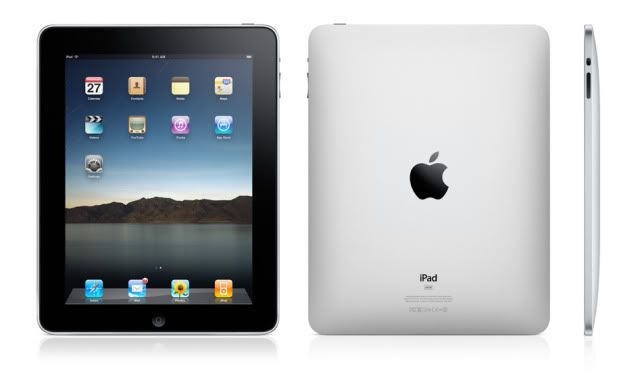
Apple announces the iPad

Finally ending months (years maybe?) of speculation, Apple finally announced their long rumored tablet computer, now know as the iPad (see, it's like iPod... but with an "a"). And, before I get into detail, I'm glad this wasn't called the iTablet or iSlate, as rumored, because those just sound awful.


(Note: This is the standard version, the pricier, 3G enabled version has a plastic black bar on top akin to the original iPhone)

Important things first, the iPad features a 9.7" multi-touch screen, an accelerometer, speakers, headphone jack, and microphone input. The standard, 16GB wi-fi enabled iPad will launch at $499, with 32GB and 64GB versions priced at $599 and $699 respectively. For those on the go, without a wi-fi signal, Apple will also be releasing a wi-fi/3G enabled version with the 16GB size costing $629, 32GB costing $729, and the 64GB at $829. Meaning that even if you get the highest model, you'll still pay under $1,000. Sure, it's still expensive, but considering what it can do, it's cheaper than Apple's Macbook options.

So, what can it do? Well, from the looks of it, it's just a big iPod touch/iPhone, right? And, to an extent, it is, but there's more to it. Most notably, the larger interface/CPU, which not only allows apps like E-mail, and Safari to run faster and smoother, but also makes them more intuitive thanks to the larger screen and ability to use a nearly full-size touch-screen keyboard.

Other apps, like iPod and the iTunes and App Stores now benefit from an interface that closely resembles their PC/Mac counterparts, instead of dealing with the iPhone/iPod touch's small screen and touch keys. Also adding to the Mac-like feel of the iPad is a new version of iWorks (for Windows users, this is basically Apple's version of Office), which gives the device a purpose for those looking to use this for work, and not just entertainment or relaxation purposes.

Which brings me to the next feature, iBooks and the iBookstore, not to be confused with Apple's old iBook laptops. Much like the iTunes and App Stores, the iBookstore will allow you to purchase digital versions of new and classic books, with full color printing (so yes, even comics could be available, assumingly) and even added features like audio/video can be included as well; which gives it a bit of a step above Amazon's popular Kindle eBook reader.

But what about all of your iPod touch and iPhone apps that you've purchased over the last few years? Great news! Most, if not all, iPhone apps will run on the iPad without issue. And you can even choose between the option to use them at their original iPhone resolution (in a smaller box), or stretch them to run at full-screen. So if you were to hypothetically buy an iPad right now, you'd need not to worry about repurchasing all of your favorite apps.

Lastly, those looking for a much more computer like interface, Apple will also be releasing a propriety keyboard that also doubles as a stand, giving the iPad the look and feel of a mini iMac, but with an awesome touch-screen display. The standard wifi version of the iPad is expected to ship this March, with wifi/3G enabled iPad expected to release some time this April.

For more information, pictures, videos, and far better explanations of the features, be sure to visit Apple.com's new iPad website.

Tuesday, October 14, 2008

New Macbooks and more

Like last month's iPod event, Apple held a conference today to display and discuss their new line of Macbooks and Macbook Pros. Also, it could be seen as away for those of us who bought Macbooks and iPods in the summer to feel like crap, who knows.


First off was the newly redesigned Macbook Pro, which finally recieved a major exterior upgrade, ditching the Powerbook G4 design it has retained since 2003. This new design features a 39% larger, glass trackpad, which also doubles as a button. This new trackpad will also feature 4-point touch gestures, a step up from the previous 3-points of the current Macbook Pros. It features black keys like the Macbook Air, and all of the connection points appear on the left side, while the disc slot is now on the right. As for these ports, you'll get: Magsafe, Gigabit Ethernet, Firewire 800, two USB ports, a Mini Display Port, Audio In/Out, and ExpressCard 34. This means there is no more FireWire 400 support, and no more regular DVI port, not a huge loss, but a loss none the less.

The screen is LED, and encased in glass; so to those, like myself, that enjoy the matte-screen, tough luck (sigh). Also, these new Macbook Pros will feature TWO graphics cards, one NVIDIA GeForce 9400M for most of the time, and one NVIDIA GeForce 9600M GT for when you really need it. There are two models available as of today, the entry model at $1999, and a more powerful one at $2499; both are 15.4" screens. The 17" is still available, however it's essentially the previous design (at $2,799) but actually is less powerful than the new 15" higher model. For more info see Apple - Macbook Pro


Next up is the new Macbook Air, since the model is still new, there isn't anything major like the Pro. However, the Airs will now have a NVIDIA GeForce 9400M graphics card, a mini-DVI port, and a 120GB hard drive (a step up from the current 80GB). However, unlike the Pros, these won't be available until early November. For more info see Apple - Macbook Air


The next product is not a Macbook, its a new 24" Apple moniter. It resembles the current iMac, and new Macbook Pros with is glass screen and black trimmings. But it's has a pleathora of features to boot that the current Apple displays dont have: 1920 x 1200 pixel resolution, a built-in iSight and mic, stereo speakers and a three port USB hub. And it connects to both the Pro and Air via their new mini-DVI ports. For more info see Apple - LED Cinema Display


Lastly is the biggest announcement, the all new Macbook. It has the same design as the new Pro, but obviously things are scaled down. Same glass LED screen (13.3"), same metal casing, same multi-touch track pad, mini-DVI port, 160GB Hard drive, and NVIDIA GeForce 9400M graphics. So now those without a need to go Pro still get a feel of power. And for those that dont care, the white plastic Macbook will still be available for a new entry price of $999, though will obviously not have all the features of the new model. The first of the new models will be $1299, with a more power, 250GB, back-lit keyboard model at $1599. For more info see Apple - Macbook

At the end of the conference there was some Q&A. Things lke the 17" Pro are said to be in the works, and the status of Blu-Ray and HDMI came out, and were shot down. Sadly they also shot down matte screens, saying that the LED backlighting would make up for reflection on the glass.

And that pretty much does it, make sure you check out the provided links for each product to really get to know what's new. Personally, I won't be interested in these new models because I just got a Macbook Pro in the summer, and it's the best computer I've ever had. For practicality's sake, there's just no need for me to upgrade for another few years. And I'm sure by then there will be another redesign or two.

Tuesday, September 9, 2008

iTunes 8 Impressions

So, as reported before, I went and downloaded iTunes 8. Right off the bat you'll be introduced to the new Grid view. The view is essentially the same view that Movies and TV Shows were displayed in iTunes 7. But if you're not a fan of that, no worries, because like before, you can change between the List and Cover Flow views. With Grid view, you have some options. You can view your Library by albums, which shows cases the Albums in order of artist and display the artwork. There's the Artist tab, which will feature the boxart of the first album listed for each artist.

The next tab, Genre, is different in that the image it uses to display each catagory is represented by a generic image pertaining to that Genre; if a genre is without an image, it displays the first available album art. Scrolling across each of these genre tabs will display the art of album in that genre, allowing you to see albums from that category as well. This Genre tab is also available in the Grid views for TV Shows, Movies, and Podcasts. After selecting an album, you can press it to play instant, or double click it to view all tracks in a list/art combo view, similar to what was available in iTunes 7.

The next feature is Genius. Now you may remember in the iTunes Store there was an option called "Just For You" which would show titles based upon what you had purchased. You may also remember that the feature always had BETA by it; there's a reason, because it's Genius now. Just For You is no longer in the iTunes Store in favor of this new system. To set it up, select Genius from your Playlists and it'll get to work. Now when you select a track, you can hit the Genius button on the bottom bar and a Playlist will form of similar tracks. I'd say the feature works quite well because I've discovered similarly toned songs without ever thinking to relate them. Also available is the Genius sidebar, which can be shown or hidden with the click of a button. What this does is, by highlighting a track, it'll display similar songs that are available in the iTunes Store, and you can preview the track right there without having to access the iTunes Store.

However, there are going to be those who would rather not bother with this system, and that's fine. You need to set up Genius, so if you never set it up, you never have to deal with it, it's that simple. However if you do set it up, but would rather not use it, you can choose t hide the side bar and simply ignore the option in the Playlists. And if you don't like the Grid view, and feel more comfortable using the List or Cover flow views, then by all means do so.

All in all, I think these new features are quite welcome to iTunes and just music listeners. The Genius tool does make you think about your Library, especially when you see similarities in tracks you would have never associated together. My only gripe about Genius is that it only works with tracks available in the iTunes Store, so if you want to find something similar to the "Kid Icarus theme" of off Super Smash Bros. Brawl, you're out of luck. And honestly, being selective like that sucks. But, chances are, if you're getting a new iPod, you're ging to have to get this new iTunes eventually, so you might as well deal with it.

Also, I almost forgot, but there's that new Visualizer. Me forgetting basically shows how much of a deal it is. And apperently iTunes had a visualizer in previous versions, but i guess this just goes to show its use. The graphics are nice I suppose, but it's a completely useless feature.

New iPods and iTunes 8

Apple held a conference today, and with it came the announcement of brand new iPod models and colors, as well as a new iTunes.

The biggest announcement of the event, and obviously most evolved product is the new iPod nano.

Returning to the tall shape the nano was meant to be, the iPod now features a rounded shape, as well as a longer screen. With this longer screen, you now have the same view that iPod Touches and iPhones enjoy. That also includes the accelorometer, for turn-style widescreen viewing as well as other nifty features. For instance, to shuffle to a random song, just give the iPod a shake, and there you go. As you can see, it's available in a whopping 9 different colors, so now you can't complain. And in another crazy twist, all colors are available in both the 8GB and 16GB models. For full info, specs, and a video tour check Apple.com - iPod nano.


Next up in the new design division is the redesigned iPod touch. Although not a major overhaul like the nano, the touch takes a design cue from the recently released iPhone 3G and has a rounded back, thought it's still relatively thinner than the iPhone because it lacks the phone aspect. And unlike the 3G, there are no color options for the touch, just the standard chrome backing. However, like the iPhone, the touch now features a built in speaker for listen without headphones. There's also a longer battery life, and a new interface for Nike + iPod for you joggers. For full info, and specs, check Apple.com - iPod touch.


The iPod classic doesn't get a fancy sleek design like its brethren, but it still get's tech on. The only major addition to the classic's firmware is the new Genius function that's available across all the new iPod models and iTunes, of which I'll explain afterwards. But Apple's big push with this model is that it "one size fits all" in that there's just one 120GB model, for $249, you just have to choose the color. That makes it the largest iPod available, storage wise; the previous 160GB model is no more. You'll just have to ask yourself if you want more data, or more functionality when it comes to purchase time. For more info, see Apple.com - iPod classic.


This last model is the poor iPod shuffle, who doesn't get much to say. The only difference between these models, and the previous ones, is color. Dropping the dull tone of the last-gen iPods, these new shuffles select a couple colors from the nano's new set. For more see Apple.com - iPod shuffle.

Last, but not least is iTunes 8. This new iTunes boasts the new Genius tool, which is also on all the iPod models, minus the shuffle. What Genius does is, by selecting a song, and then the tool, it will create a playlist of similar tracks based on genre, beats per minute, and other data. With the new Genius sidebar, you can also find similar tracks from the iTunes Store, instead of just your Library. Another feature of this new iTunes is the Grid view, which like Cover Flow, displays all of your albums by there art. This option lets you click an album and instantly play it. The last new feature is the Visualizer, a pretty standard option in most music players, so I'm surprised it has taken this long to hit iTunes. To learn more, and download iTunes 8, click here.

All these iPod models are available now at Apple.com, as well as Apple Stores around the world, and soon at local retailers. For the new iTunes 8, click here.

Personally, I think the new nano is the neatest of the bunch, only because it's so drastically different. I also think that the musical interface of the touch, with the functionality of a classic iPod makes for a great transition between models. But I still have my last-gen iPod touch and 2nd generation nano, and I'm not complaining. However, I'm going to get the new iTunes and I'll be back with impressions later.

Saturday, July 5, 2008

Mac Attack!

So, the FedEx guy left about an hour ago, dropping of my new MacBook Pro and iPod Touch. I've just finish setting everything up and registering it all and now I'm testing out Safari.  Chances are all of my updates will be coming from this computer sooner or later, so I'm trying to just get used to it all. And hey maybe eventually I can provide you with some Mac and iPod Touch gaming impressions!

Monday, June 9, 2008

iPhone 3G is go!

The conference may have finished, and Apple's website is already relaunched with all interesting facts on the new iPhone. You can check it out here. Once there be sure to look at the Features page for all the new things you'll be able to find on it. Also make sure you you look at the App Store page for footage of Super Monkey Ball in action with motion controls to boot! (it's a short vid, small, and no sound, but you'll get a good idea of how it looks and works)

All this new stuff seems quite interesting, especially the Apps (and more so the gaming) aspect of the iPhone and eventually the iPod Touch. Though I don't truly think its gaming market could over take DS or even the PSP, I'd be very curious to see how serious both Apple and 3rd parties get about iPhone gaming. Considering the Mac gaming community hasn't moved since 1995 I don't think there's much to worry about, but maybe this is finally the right step ahead.

iPhone/Touch Games

Today marks the beginning Worldwide Developers Conference this year, and with it, the keynote, which has some game developers talking about their games.

Games will be available directly from the iPhone/Touch via the App Store, which comes with the 2.0 firmware update which will be available early July. The firmware update is free for the iPhone, but unfortunately, will cost Touch users $9.95.

Sega was the first developer shown, with Super Monkey Ball, which will feature accelerometer control in 110 stages spanning 5 worlds. The game will be available at launch of the App Store for $9.99, which is a very decent price.

Pangea Software showed off two games, Enigmo and Cro-Mag Rally. Enigmo is a physics-based puzzle game, while Cro-Mag Rally is a racing game featuring tilt control. Both games are also available at launch and for $9.99.

There is another game, called Krull, by Digital Legends Entertainment, which features good graphics and some warrior…I don't know…it should be out this September.

I’m sure there a ton of other developers working on games for the iPhone/Touch, such as EA, but nothing was specifically mentioned, yet.

I'm pretty excited about some games, and I hope they keep getting support, although I'm not too sure. The "jailbroken" Touch is nice, with all the free apps and games, but something a bit more substantial will be good, especially seeing as how you don't have to carry around carts or UMDs like the DS and PSP. However, in no way will the iPhone/Touch games be better or take over the DS and PSP market. Not a chance in hell.