Showing posts with label Touch Generations. Show all posts

Thursday, June 11, 2009

Personal Trainer: Walking review

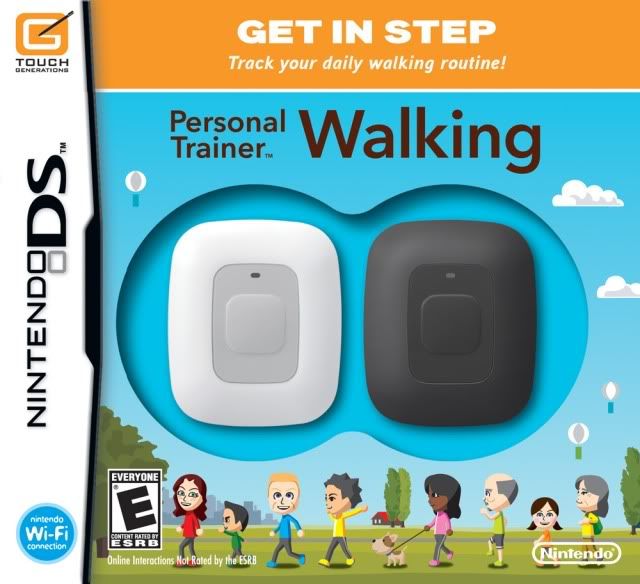
Nintendo ups the peripherals (and the price) on the Nintendo DS with their latest entry into the Personal Trainer series, Person Trainer: Walking.

The main feature of Walking can be seen through a plastic window on the box itself, the "Activity Meters", which are pedometers made by Nintendo to be specifically used with the game. Each pedometer has a button, a blinking light, and an infrared port on it. The button and infrared port are used to transmit and receive data with the game via Walking's infrared DS game card, which looks black but is actually a dark, clear red, and clearly distinguishable to the typical gray DS cards. The light on the device will normally blink red with every step, however, if you achieve your step goal (which I'll get to later), the light will blink green to indicate that you've reached your goal.

The Activity Meters are pretty well built, and are durable. I've been wearing mine daily since I bought the game, either clipping it to my waist when I go outside, or leaving it in my pocket while I'm at work. Though I do have one issue with it, out of the box, the meters do not have their clips attached, instead requiring you to unscrew the original back-plate, and replace it with the included clip plate. It's easy to do, but it just seems like a waste to me, because it's not as if the clip gets in the way when you don't need it, as the meters are pretty much the size of a matchbook. But because the game comes with the two meters, extra clip backings, and the fancy infrared game card, the game prices in at $50, certainly a big step over the $20 that Touch Generations titles are usually priced at.

Gameplay
Despite the pricetag, there isn't much to this "game" in terms of gameplay, as the attention is on the Activity Meter devices. Instead, the game does it's job by reporting and analyzing your walking data, and allowing you to do some things with said data. And if this game sounded to you like it was aimed at the Wii Fit crowd, then you'd be glad to know that it's all hosted by a personified Activity Meter, just like how Wii Fit has the Balance Board guiding you through the game.

When you first register an Activity Meter (you can register up to 4 per game, though only 2 devices come with the game), you will be asked some questions, such as age, rate of activity, etc. You can then set the device for a human, or a dog; yes, the officially makes it the first handheld game that dogs can participate in. Selecting human will allow you to either make a Mii directly in the game (a DS first), or connect to your Wii and transfer a Mii via the Mii Channel (also a first). The creation tools on the DS work just like the Wii, although now you can select between 6 different outfits. Those looking for the same fun creation tools for dogs though, will be disappointed, as you can only select from the randomly assorted dogs in the game, and you can't customize them to match your own pooch.

But enough about Miis, lets get to where the game is focused, walking. For me, the game seemed intriguing because I personally do a lot of walking, more so when I was living in the city; but I never had a clear idea of how much I was actually walking, so I figured this would be a fun, new way to find out. After doing my daily walking around, I just open up my DSi, start the game up, choose "Check Your Rhythm", press the button on my meter, and BAM, all my data for the day instantly on my DS. What's neat is that the game will show you how active you are ever hour, minute, and if you check your Records, you can also check steps and rhythm by weeks, months, and even year once you get there.

However, if charts and graphs aren't your thing (not sure why you'd get this to begin with then) there's the "Play with Records" option. Here you can play the "Walk the World" mini-game that chooses random world locations, and will draw out pictures of worldly objects with your recorded steps. Once completed, you'll get some facts and maybe even sound clips of the object you've drawn; exciting, I know, but there's over 100 things to draw so at least it's something to do. The next option is "Illuminate" which uses your steps to run a virtual generator to light up a town, however, once you reach 10,000 watts (which took me about a week) the steps generated won't do anything more, making this option pointless. There's also rankings for you to compare various stats with other users on the game.

The last option is mildly neat however, and that's Nintendo WiFi Connection support. Here you can upload your daily step data online, for participation in two events: the Space Walk, and World Rankings. The Space Walk aggregates steps uploaded by players around the world (only 1,311 at this point, sadly) counts them towards a walk a across space. As of writing this review, we're about a 5th of the way to the Moon, with Neptune being over 6 trillion steps away; no idea if it'll be anything like Noby Noby Boy's reaching for Mars, but I doubt it. None the less, it's a neat feature and I'm curious how long it will actually take to complete. The World Ranking works much like the offline Rankings, although now it's obviously everyone's steps and not just your family's; but there's some different sorting options for those that care.

Overall Thoughts
Other than the nice readings, and tacked on mini-game like features, there really isn't much to Personal Trainer: Walking in terms of gameplay, which may make the $50 pricetag sound intimidating. But if you're someone like myself who does do a lot of walking, and are interested in a better understanding of how much you actually walk, the game, and it's well built Activity Meters are certainly a fun, simple way for DS owners to do so. Though I do question the game's title, as it never actually "trains" you to walk, it just tells you how do. Perhaps this shoud've been called Personal Analyzer: Walking instead.

Overall Score: 7/10

For more on Personal Trainer: Walking, check out Nintendo's official website for the game.

Friday, December 12, 2008

Wii Music Review

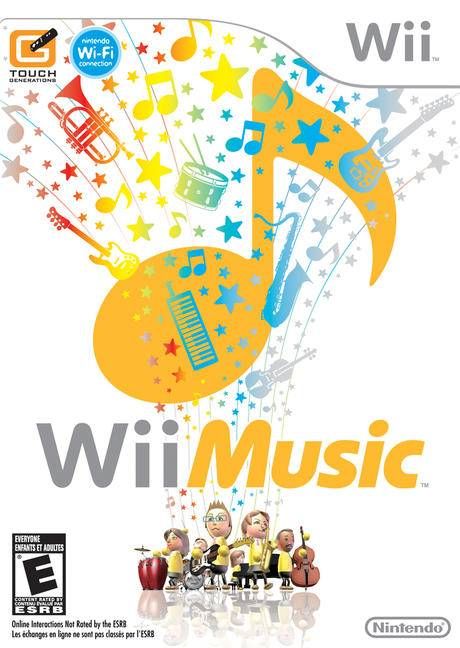
Wii Music is an interesting game, if you can call it that, and follows the “Wii” game style, allowing everyone in the family the ability to play along and possibly have fun. It’s hard to say exactly what you will use Wii Music for, but it’s most easily described as a tool to experiment with a large variety of different instruments and play along to some tunes you’ve probably heard of.

When you boot up
Wii Music for the first time, you are greeted to the quirky stylings of your composer tutor who teaches you all about Wii Music and how to play the instruments. While there are over 60 instruments, there are only 4 methods of play, which include the drum, guitar, trumpet, and violin styles. All of these methods are fairly easy to play, of course, although they each have their depth. First of all, the drum style simply has you swinging the wii remote and nunchuk downwards, as if you were using drumsticks or playing a piano. The guitar style has you holding the nunchuk up in your left hand, and strumming with the wii remote in the right. The trumpet style uses only the remote, where the sensor faces your mouth, and the 1 and 2 buttons are used for the notes. The last style, the violin, has you moving the remote like the bow, while holding the nunchuk up like the instrument. Each of these styles can easily be played by anyone by simply miming the actions, however, each has a lot of depth also, so there is really some control to be had, where you can control exactly how your instrument sounds, without it being completely random. For instance, with the trumpet style, you can manipulate the volume and pitch of your instrument by tilting the remote, and you can manipulate almost all of the instruments by holding down a certain button, like the Z, C, or A, B buttons, or by holding down a direction. These things can alter the tremolo, muting, arpeggio, glissando, chord control, pitch shifting, trill, and other such things, so as you can see, while people who just want to mess around can very much so do that, you can also have quite a bit of control over the sound that comes out of your instrument and if you know what you are doing, you can really make a song your own.

Once you’ve gone through the tutorial, you are presented with the main hub, where you can choose from Lessons, Jams, Videos, and Games. The Lessons are comprised of the opening tutorial on how to use each of the four instrument styles and more complex lessons that teach you about the intricacies of the game. Unfortunately, which is quite strange and reflects throughout the entire game, the main lessons are not unlocked and available from the beginning, so if you were hoping to be able to really learn how things work and how to make your play time more enjoyable, you are out of luck. In order to unlock more things, like the lessons, you have to create a number of videos. This concept makes sense, as gamers like to be able to unlock more and more things to keep them interested and keep coming back, but when it comes to the lessons; it just seems a bit ridiculous to me, and especially in this game; it gets worse later.

The next mode to check out is the Jams, which is the meat of the game. In this mode, you can choose to do a quick jam, where a random song and instruments are selected, a custom jam, where you can choose everything, or the instrument improv, where you can simply play around with any instrument. With the custom jam, you pick a song, a stage, and set up each of the 6 instrumental parts: bass, two percussion, chord, melody, and the harmony part. Once you’ve played around a little bit, you can change the tempo of the song, get rid of parts, and change the overall style of a song, such as jazz, band, pop, etc. There are 10 stages to choose from and each of these is pretty cool and just adds a bit of style to your jam, which you can then save as a video. For each part of the jam, you can choose what instrument will be used, and a really cool feature is that once you have completed a jam, you can redo it with you playing a different instrumental part and go over the song again, up to five times, so you can play each part of a single song yourself and come up with something truly awesome. Because it is important to really know the song you are performing to, you can press the – button to bring up a note sheet which will show you when you should be performing a note, however, you are free to play however you like. There are also these little be-bop guys bouncing around at the bottom of the screen to keep the beat. During the performance, you can also use the d-pad to execute little actions, such as jumping and spinning, to add a little flair to your concert. Then, when you are completely done with the performance, you can make a neat looking jacket for the video, which is a sleeve for the virtual CD. There are a lot of pre-made graphics and borders for you to use, and you can then add in the Mii’s with their instruments to customize it. You can also add popularity points to the song, so you can filter it in the Videos mode later.

The Videos mode allows you to view all the videos you have created in the Jams mode. You can view a random video, or one of the top 10, and other such options, as well as send your videos to your friends, which is really cool. Your friends can even edit your videos and add in their own instrumental part.

The last mode, which I think is the most fun, is the Games mode, where you can play one of three mini-games: Mii Maestro, Handbell Harmony, and Pitch Perfect, all of which allow up to four players to play together. Mii Maestro has you playing the conductor, where you use the remote like a baton, controlling both the tempo and volume, via the speed and force of your gestures. While this is fun, I had trouble getting a good score because I was apparently uneven, and it is unfortunate that it isn’t precise, where you have to wave your hands in a particular pattern or have giving you the ability to point to a specific section to play, which would have been really cool. The Handbell Harmony game makes the nunchuk and remote a bell and you have to ring it as the symbol crosses the line, and the bell can have an accent symbol on it, giving you a total of four notes to play. Basically, this is like a music-rhythm game and is really cool as you can play with four people at once, each playing a different part of the song, but it is rather easy. Unfortunately, each of these modes only contain five songs to play along to, so once you’ve played those five songs, there isn’t much else to do with it. The Pitch mini-game is the largest, containing eight levels, and features a little listening game. There are a variety of Mii’s on-screen and each plays a specific note, and you have to choose the correct ones that answer the question, such as, which Mii is playing the correct tone, pick the two that are playing the same note, which is playing the highest note, etc. This game is fun and good for a distraction from just playing instruments.

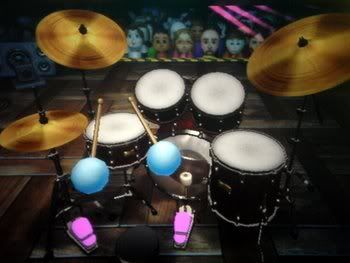
If you happen to have Wii Fit, you can also put that balance board to use, with the special drum mode, which you can also use in a Jam session. There are a lot of lessons for the drums, including learning how to control all of the 9 different drums and cymbals, and learning a bunch of different rhythms and beats. Basically, you hold a button or direction to hit a different drum, and use the balance board for the two pedals, all of which are very responsive and somewhat fun to play, although it takes a bit of practice to get it all down. This happens to be the case with all of the instruments.

It is nice to have all of these options and be able to manipulate your instruments, but it just gets a bit confusing trying to remember what seemingly random button does what and how to manipulate the instrument in the way you want. This can be especially frustrating to people who are just starting the game and don’t want to have to remember all of these things, although technically they do not have to, as mimicking the movement alone is enough to play any instrument.

Another downside to the game is all the unlocking that you must do. While
Wii Music boasts over 60 instruments and 50 songs, you only start with 30 instruments and a mere 5 songs. Coupled with the locked lessons, this is simply ridiculous, especially for a game like this, which wants everyone to be able to play from the get go. It’s good that you can unlock stuff and feel like you are achieving something, but seriously? Only starting with 5 songs? Come on. The way you unlock more stuff is by creating numerous videos, which is the main point of Wii Music, but I just don’t think I should have to play the same 5 songs over and over again to unlock another 2, and so forth, and if you don’t have anybody to play with, these few songs will start getting old and there just isn’t enough to keep you coming back for more. If you’re not that into music, the 5 songs you start with are boring and childish and you will quickly lose interest, especially if you are playing alone. If you are good at music though and can pick up quickly on the controls, you can probably do some really cool stuff, especially with the ability to play each part of a song yourself.

Overall,
Wii Music is an interesting game, and contains a lot of things to like and enjoy, but it really just depends on if it is something you can enjoy for a long period of time. I think Wii Music definitely fits into the "Wii" game series, where you are meant to play a little everyday, as opposed to putting in hour after hour. It is a game you pull out occasionally to play with your friends or family or to experiment with a new song or instrument. While there are some cool mini-games to enjoy, and a ton of interesting instruments, the limited music selection and other features ostracize it from a large population of real gamers, who just won’t find it appealing.

Overall Score - 6/10

Friday, May 23, 2008

Wii Fit Review

Wii Fit Review. Go...read it.
---------------------
UPDATE (3/22/10) VFH Classic is dead:

Nintendo’s latest foray into expanding the gaming audience and enticing the casual crowd comes in the form of Wii Fit, the game that will allow millions of users to stay in shape in a fun, enticing way. Does it accomplish this goal? For the most part.

When you start up Wii Fit for the first time, you are introduced to a talking Wii Fit board, whom is a little annoying, but luckily you do not spend too much time with this fellow. Once you start training, you get to choose a trainer, male or female, who works with you. The first thing you do is choose a Mii to represent you, and then you enter your height and birth date. Then you are given a Body Test, which you can choose to take everyday, which is the thing that calculates your Fit Age, which is similar to your Brain Age in…Brain Age. The Body Test consists of three tests, two of which are randomly generated and change day to day. The other is a balance test which shows where your natural center of balance is. Then you are given your BMI and weight. After this, you are asked if you would like to make your account password protected, so other users won’t see your weight, if you are embarrassed about that sort of thing. I thought this was an interesting option to have, but a useful one. The other interesting feature was the fact that you can set a goal for yourself, for instance, losing a certain amount of weight. The time of these goals is set up in 2-week intervals, so you can set your goal for 2 weeks, or a month, and so forth. You can track your weight and BMI, and how your goal is coming along via charts. These charts track your weight, BMI, Fit Age, and activity log. There is also a calendar where you can stamp the days in which you exercised using Wii Fit, just like Brain Age. The activity log tracks the amount of time you worked out in each section of Wii Fit, plus any time you add yourself for doing activities outside of Wii Fit.
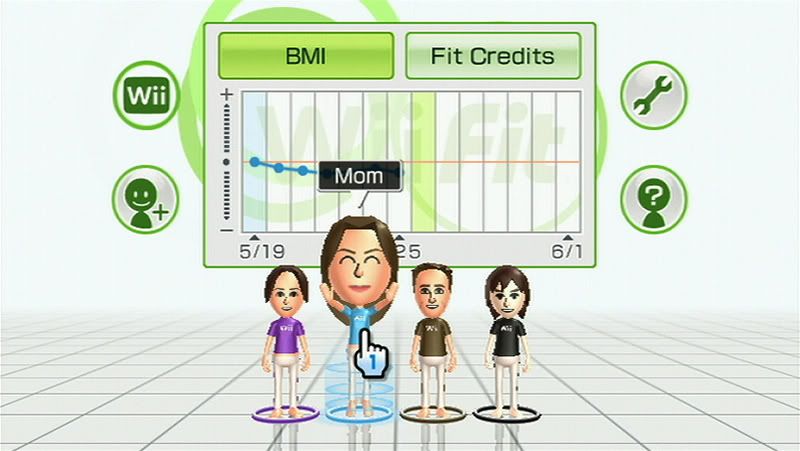

An example of a graph. You can easily select the Mii of your choosing and then head straight into training.


When you are done tracking your stats, you can select to do some Training with Wii Fit. The Training is separated into four sections: Yoga, which has 15 exercises; Strength Training, with 15; Aerobics, with 9; and Balance Games, with 9. The first two sections use your selected trainer to help you, while the latter two are set up like mini-games. Unfortunately, Wii Fit is set up like a game, in that not everything is available to you from the get-go, so half of the exercises and games need to be unlocked, which while gives some people an incentive to keep coming back, can make others who seriously want to lose weight and get in shape upset, as they cannot do everything they might want to from the beginning. Along with half of the exercises being inaccessible, Wii Fit also locks out the ability to do more than the minimal amount of reps. However, once you do an exercise more than once, you unlock the next level of repetitions, and so forth, which is good, but they should have given users the choice from the beginning, as people are at different health and ability levels. This is only a minor gripe though. The way in which you unlock everything in the game, minus the reps like I previously mentioned, is by doing the exercises and games. For every minute of work you do in the game, you get a Fit Credit, which is added to your Fit Bank, which is simply used to show you how long you’ve worked each day. When you receive enough Fit Credits, you unlock a new thing, which you do not choose yourself, which is a bit unfortunate, but fine. I think it is good that you do not get Fit Credits according to how well you perform in the exercises and games, as some people may not be able to perform them well, and Wii Fit should not discourage them due to this. By allotting Fit Credits with the minutes of work you put in, everybody who plays wins, so you keep getting new stuff even if you cannot do the exercises or games very well.


It's scary how accurate the Wii Balance Board is, but it's really cool to see how your center of gravity and balance changes.


The Yoga section is made up of various yoga poses, the first of which is Deep Breathing, and helps to teach you how you should breathe in a deep, soothing manner as you perform each pose. This is facilitated by having a very light blue circle getting smaller and then bigger, accompanied by a soothing ocean breeze-type noise, which you are supposed to follow with as you breathe. These workouts mostly focus on stretching and strengthening various areas of your body. When you are selecting each work out, it will display, as well as describe, which body parts and muscles you are exercising.
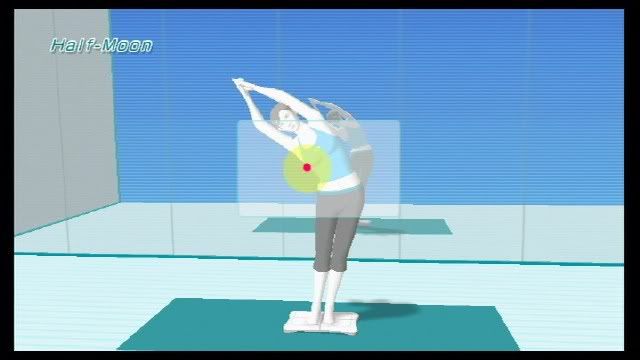

She'll help you out as you go, and tell you when to shift and move and everything. She'll even let you know how you are currently doing. Just try to keep that red dot in the yellow. In other exercises, there may be a bar that shows you how long you should be holding a certain position.


The Strength Training section is very similar to the Yoga section, in that it is accompanied by your trainer. Your trainer is a very nice fellow or lady, I chose the lady. She speaks very quietly, and soothingly, in a non-threatening way, which is very nice. The first time you attempt an exercise, your trainer will demo it for you and show you how to do it correctly. When you actually do the exercise yourself, you can choose to view your trainer from the front or back. I chose the behind view so I could more easily mimic the trainer, as I find it confusing to view from the front. The trainer will instruct you on each step, so you do not get lost while doing it, as some of the moves will have you in positions in where you cannot easily see the tv. Also, when a new step comes up, a whistle sound is made to notify you of it. A good thing about the trainer is that he or she will help you with the exercises and push you to do better. He or she will let you know how you are doing and give encouragement and tips on how to do better. The Balance Board is used in these exercises to monitor your balance and how still you are staying. Your center of gravity is shown as a red dot, and you will want to keep it within a larger yellow area, and as your weight shifts, the red dot will move around. At the end of each exercise, you will be awarded points by how still you were and how well you kept your balance. These points are tracked via a high score list for every event in Wii Fit, which is nice because you can see if you are doing better or worse. Also, each point score is accompanied by a star rating and a title for that star rating. This high score list is also kept up with other users so you can see who is the best.

With the Strength Training section, there are a few events that are titled Challenges. These allow you to do more than simply a few reps, but to go on for as long as you can and really push yourself. One of these challenges is a push up challenge, where you try to do as many as you can. These challenges will really give you a workout and allow you to show others what you can do, and are a good way to wrap up a workout.


The Aerobics section has a few neat exercises, including Jogging and the step games. After jogging a couple times, you get the option to extend the jogging time and change the route, which allows for a bit of variety. Jogging does not use the balance board, but instead uses the Wii remote, which you put in your pocket or hold in your hand and then jog in place. If you are standing still, then you won’t move anywhere in the game, and the faster you jog in place, the faster your Mii goes. I think it is cool how your Mii is running and other Mii’s run on by, waving at you and other things. The environment is pleasant, but more noticeably on the longer runs, there is no music. I took a 10 minute jog today, and it was kind of boring. While there are environmental noises, there are not that many and it was just a bit silent. I would have thought Nintendo would have at least added in some serene music or melody that you could jog to.
Another cool game is the step game, which is semi-similar to DDR. In this game, you simply step on and off the board when directed to do so, and you are graded on your timing. It is very rhythmic, and you can unlock faster and more difficult step routines as you progress.
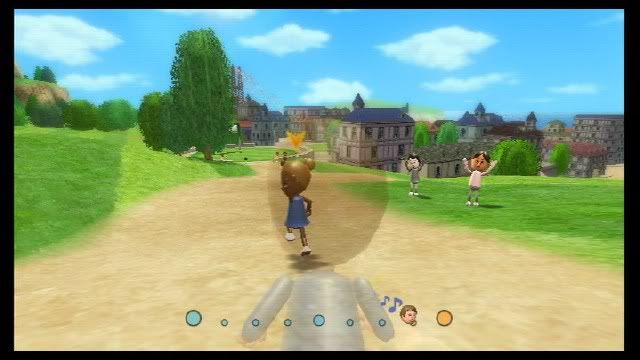

Jogging. This is where I like to start for a good warm-up. It's cool how your Mii's are walking by and there are even some dogs...some crazy dogs that made a 50-foot drop...it was odd. Unfortunately, the same events happen, so the scenery gets a bit repetitive, but it's fine.


The last section is the Balance Games section. Here you have all the fun, and challenging, games, such as the tight-rope cross, the marble game, the skiing game, and many more. These are all pretty cool and come with multiple difficulties. These are however, merely a distraction from the true purpose of Wii Fit, and if you are only getting Wii Fit for these games, then you will be disappointed, as each are fairly short and most lose their novelty after a few times. That is not to say though that they are not fun and creative, because they are, but they are not worth $89.99. Also, do not be discouraged if you do poorly the first time, because the first time I did the marble game, I was like, zomga, I suck. I was more than disappointed in myself, but then I tried again the next day and did much, much better, so it just takes getting used to.
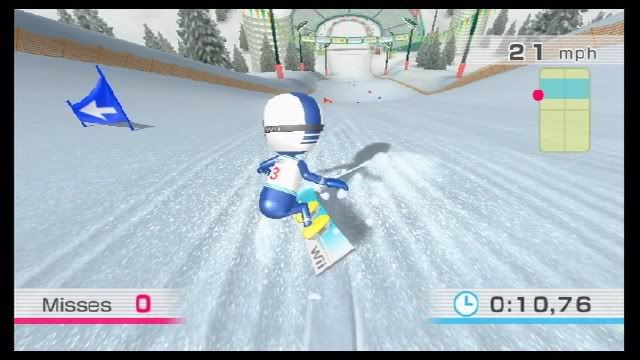

One of the balance games. Again, there is a balance meter on the right and if you are in the blue, then you will go significantly faster, which can be dangerous, as it may cause you to miss a gate. Fun stuff.


Overall, Wii Fit has been made very well. It’s very crisp and clean looking and very simple to use and navigate. There are a few problems I see with it though. For one, while it does have a dynamic system for telling you how you are doing, you could easily be doing a Yoga routine incorrectly, and the game would not know, so you are limited in that respect. Also, Wii Fit merely presents you with a bunch of “random” exercises to do, and does not really give you a complete workout routine to do. It does give you a Yoga and Strength Training exercise to do together, but this is hardly a full workout. It would have been nice if they could give you tips on 5-10 exercises to do one after the other to complete a workout. Also, if you happen to be an athlete or in decent shape, then Wii Fit might not be that much of a workout for you. You might be able to benefit from Yoga though, as it can help with your balance and stretching, however, the strength training might not help that much. However, I believe Wii Fit would make a very good compliment to a healthy lifestyle and can be used very well to record your progress. However, if you are merely relying on Wii Fit to get you in shape, then you are most likely mistaken, but it will make people a little less sedentary and help guide them to a healthier lifestyle.

After saying these things though, some of the exercises do indeed get your heart racing and make you sweat and get you sore. These routines will most definitely help to tone your body, but they simply won’t do everything. I hope Nintendo will release a Wii Fit 2 or allow for downloadable exercises to extend their regime, which could add in the missing pieces that can make for a complete workout. The current setup is perfect, as it mixes work and play with good stat tracking and a safe and unintimidating environment.

For those curious, the Wii Balance Board is very sturdy and can support up to 330 pounds. It has little bumps so your feet can "grip" the board and you won’t go slipping off. It also offers a large power button that you can easily press with your foot as opposed to bending down. A problem I found is that it is too white, and you are not supposed to wear any socks while using it. Apparently though, my feet are dirty and after a few minutes, I could see a black outline of where a part of my foot was, which is not good, so I decided to wear socks. I think the reason they do not want you to wear socks is that you will probably have a better chance of slipping and hurting yourself, which Nintendo of course does not want.
You can also install the Wii Fit Channel, which features everything Wii Fit has to offer, except for the Training, so you can view charts and do the Body Test.

8.5/10